PRODUCTS
CONTACT US
TEL: +86-532-85754589,85775618
FAX: E-Mail
E-MAIL: tlead.net@gmail.com; tlead.net@hotmail.com

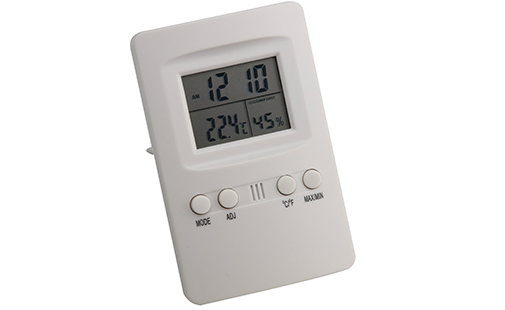
Keywords: Indoor Thermometer, Hygrometer, Digital Thermometer Hygrometer, Temperature Humidity Monitor, Room Thermometer
Digital Thermometer Hygrometer & Temperature Humidity Monitor with Calendar, Alarm and Comfort Level Indicator
The IT-202 is a compact, easy-to-read indoor thermometer and hygrometer that combines a digital thermometer hygrometer, calendar and clock in one device. As a reliable temperature humidity monitor, its large two-line LCD display shows current temperature and relative humidity at a glance, while a built-in comfort indicator lets users quickly judge whether indoor conditions are comfortable. With Max/Min memory, dual alarm modes and switchable units, this room thermometer is well suited for home, office, greenhouse or workshop use.
1. Large two-line LCD display for simultaneous temperature and humidity readout
2. Accurate indoor thermometer and hygrometer in a single compact unit
3. Built-in calendar function
4. Hourly time signal (chime)
5. Daily alarm function
6. Switchable 12-hour / 24-hour time format
7. Switchable °C / °F temperature units
8. Comfort level indicator based on relative humidity
9. Max / Min memory for both temperature and humidity readings
10. Reliable temperature humidity monitor for tracking indoor climate trends
11. Compact size, ideal as a desktop, wall-mount or shelf room thermometer
| Temperature Range | -5°C to 50°C (23°F to 122°F) |
| Temperature Resolution | 0.1°C (0.2°F) |
| Temperature Accuracy | ±1°C (±1.8°F) |
| Humidity Range | 30% RH to 90% RH |
| Dimensions | 70 x 20 x 110 mm |
| Power Supply | 1 x AAA battery (not included) |
| MODE | Switches between Clock mode and Alarm mode. Press repeatedly to cycle back to Clock mode. |
| ADJ | Displays the date for 3 seconds when pressed in Clock mode; used to adjust settings in Setting mode. |
| MAX/MIN | Displays the recorded maximum or minimum temperature and humidity readings. |
| °C/°F | Switches the temperature display between Celsius and Fahrenheit. |
1. Press and hold MODE for 2 seconds to enter Time Setting mode.
2. Press MODE to step through the settings: minute, hour, 12/24-hour format, date, and alarm.
3. Press ADJ at each step to adjust the selected value.
1. Press MODE until Alarm mode is shown, then press ADJ to cycle through the following indicators:
— Bell icon: Alarm is enabled
— Bell icon + "CHI": Hourly chime is enabled
— Bell icon + "/CHI": Both alarm and hourly chime are enabled
— No icon: Both alarm and hourly chime are turned off
2. When the alarm sounds, press any button to silence it. If left untouched, the alarm will stop automatically after 1 minute.
Whether you need a dependable indoor thermometer for your living room, a compact hygrometer for a nursery, or an all-in-one digital thermometer hygrometer for the office, the IT-202 delivers accurate readings in a space-saving design. As a trusted temperature humidity monitor and everyday room thermometer, it helps you keep indoor conditions comfortable year-round.